
Practical guide · Updated October 16, 2026
How to choose interactive floor plan software for a real estate development.
Choose software that represents your project accurately, fits your website and gives buyers or renters the information they need.
When comparing interactive floor plan software, first evaluate how someone moves through the project. Then check the clarity of availability, what your team can update, integrations, analytics and support. Test a real configuration on both mobile and desktop.
1. Start with the visitor journey
“Interactive floor plan” can describe a simple clickable image, a 3D tour or a more complete Unit Explorer. Define the decisions visitors need to make: choose a building or floor, find available units, filter results, open a floor plan, save favorites or inquire about a specific unit.
Also check whether the solution fits the project’s real structure: one building, multiple buildings, several phases, multiple projects, or different inventory types such as condos, apartments, houses, lots and commercial spaces.
2. Is the project itself genuinely interactive?
Displaying an image or floor plan is not enough. Depending on the project configuration, visitors should be able to follow a clear visual path — Project → Building → Floor → Unit — and understand where they are at every step.
Ask to see project images, building views or floor images with areas that are genuinely clickable. Availability, filters, unit details, floor plans, media and direct links should belong to one connected journey, not a series of disconnected pages.
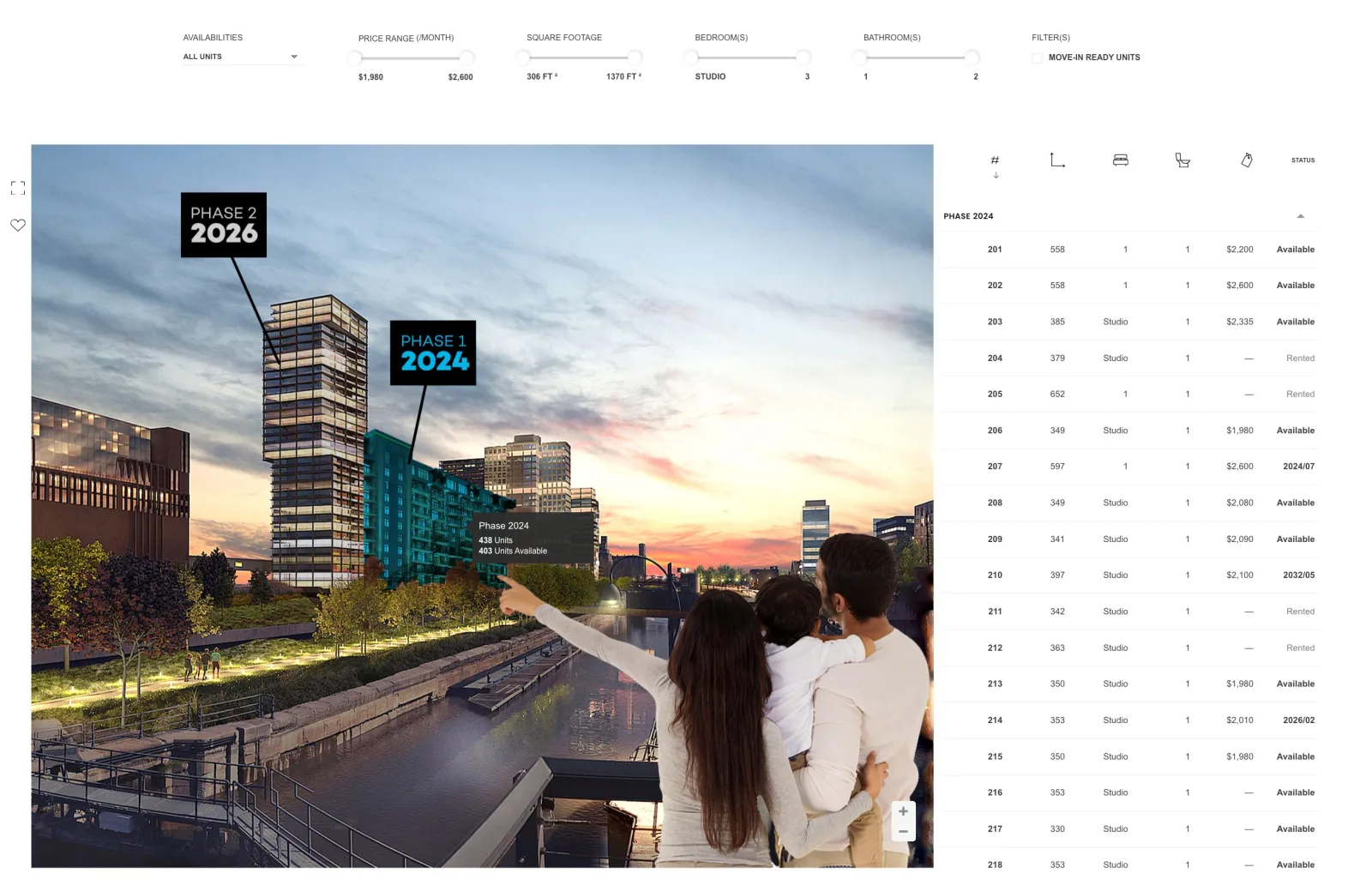
- 1 Visual project navigation
- 2 Filters that match the search
- 3 Availability that is easy to understand
- 4 Access to unit details and floor plans
Then repeat the same journey on a phone and tablet. The Smart Condo Plans demo lets you try the Unit Explorer directly.
3. Is useful information clear at the right moment?
A polished project view does not replace information that is easy to compare. Check what the selected configuration can display:
- current status and availability;
- price, area, bedrooms, bathrooms and availability date;
- filters that match the project’s real criteria;
- floor plans, images, videos or virtual tours when supplied;
- a direct link to the unit or filtered selection;
- favorites and unit-specific inquiries when those features are enabled.
Test one complete unit and another with less information. The journey should remain understandable in both cases, and an inquiry should preserve the project and unit context for useful sales or leasing follow-up.
4. Can your team keep the information current without editing the website?
A good Unit Explorer separates day-to-day inventory updates from website development. Check whether authorized members of your team can maintain the relevant information without asking a developer to change the website every time.
Depending on configuration and permissions, Smart Condo Plans allows clients to manage information such as unit status, price, availability, availability date, unit details, media and floor plans. Relevant presentation, theme or branding settings may also be available for the project.
During the demo, have the person who will do the work update a unit. Check their access, how quickly the change appears, how an error is corrected and which source controls availability.
5. Does it fit your website and brand?
Your website already has navigation, a visual identity, forms and sometimes several languages. Check whether the Unit Explorer can fill a page or sit within an existing section, and whether it remains usable on desktop, tablet and mobile.
Evaluate colors, themes, typography, labels, direct links and language changes. If your technical team needs them, ask which custom CSS or JavaScript options are available and who validates loading, display and forms before launch.
6. Can it connect with the tools your team already uses?
Start with a real workflow—for example, sending an inquiry with the project and unit viewed—and ask how the solution can support it.
Confirm the available options for Zapier, Make, HubSpot or your CRM, along with API access, webhooks and custom integrations. Ask which data and events are available for your systems and project configuration. Review the Smart Condo Plans integration options to prepare that discussion.
7. Can you see which inventory visitors are actually looking at?
Analytics should help the team understand interest in the inventory, not only total website visits. Ask whether the Analytics Dashboard can show unit views, favorites, inquiries and trends, depending on the configuration.
Check who can access the results, how projects are separated and whether a Monthly Analytics Report is available. Confirm the definitions too: a project view is not a unit view, and a click is not an inquiry.
8. What happens when something does not work the way you expect?
A live real estate project evolves: floor plans change, another phase opens or behavior needs adjustment. Ask who provides installation instructions, supports the website team, validates the integration and remains available after launch.
A bug, a question or something that does not work as expected? The important criterion is knowing who will respond and how the issue will be reviewed with your team. Smart Condo Plans clients can contact the team and work with them to find a solution that fits the project.
Before choosing, also open client projects comparable to yours to check the integration, mobile navigation and fit with each project’s brand.
9. Final evaluation checklist
Before choosing a solution, verify the following:
- Can visitors navigate the project easily?
- Is the project image genuinely interactive?
- Is availability clear and current?
- Can your team update key information itself?
- Does it support your building, phase or project structure?
- Are filters, floor plans, media and favorites easy to use?
- Do links and inquiries preserve unit context?
- Can you see which inventory interests visitors?
- Does it fit your existing website and brand?
- Can it connect with your other tools?
- Will someone help during installation and when something goes wrong?
Put the guide to work
Evaluate the software in context.
Explore features
Review navigation, management, inquiries, and analytics.
Website and toolsExplore integrations
See how Smart Condo Plans fits your website and workflows.
ExamplesView real projects
Open client websites and compare different project types.
DemoTry the Unit Explorer
Follow the same visual journey a real website visitor would use.